How to Reduce Radio Stream Latency Without Causing Buffering
Before trying to reduce radio stream latency, establish exactly what you are measuring. Latency is the time between an event occurring at the live source and the same event being heard by a listener. That delay can be introduced by the automation system, encoder, Icecast or Shoutcast server, relay, reverse proxy, player and listener connection. Measure a repeatable baseline, change one setting at a time, and confirm that any reduction in delay does not introduce buffering or dropouts. Latency is different from a stream that is offline, repeatedly disconnecting or silent. To distinguish availability from silence during testing, review the monitoring FAQ, and use the plans page when you are ready to arrange external checks.
Define the delay before changing any settings
Not every delay is the same. A player may take several seconds to start because it is building an initial buffer, then continue at a stable distance behind the live source. Another player may start quickly but gradually fall further behind. Those are different failure patterns and should not be treated as one problem.
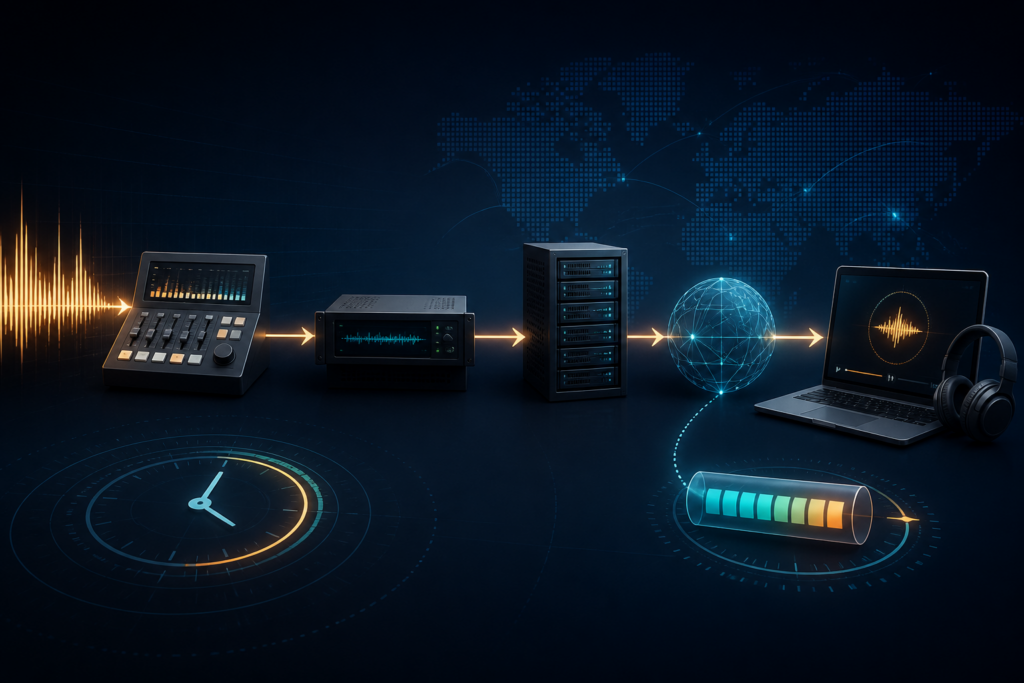
The end-to-end path normally includes:
- Automation or playout software: produces the live or scheduled audio.
- Encoder: collects, encodes and sends audio to the streaming server.
- Icecast or Shoutcast: accepts the source connection and serves listeners.
- Relay, proxy or CDN: may add another connection, queue or processing stage.
- Player: decides how much data to collect before starting and how to respond to network variation.
- Listener connection and device: can introduce additional buffering, packet loss or playback delay.
Because each stage can add delay, two listeners using the same URL may hear the programme at different times. A useful investigation therefore begins with a controlled measurement rather than an assumption that the encoder or server is responsible.
Establish a repeatable latency baseline
Use a clearly identifiable event at the source, such as a spoken time marker, hand clap or short test tone. Record the exact time it occurs, then note when it is heard from the public stream.
- Use the public listener URL. Test the endpoint your audience actually receives, not a local monitor or encoder preview.
- Use the same player and device. Keep the test conditions consistent so that later measurements are comparable.
- Repeat the test. One result can be misleading. Run the same test several times and record the range.
- Observe the stream for several minutes. Check whether the delay remains stable, grows gradually or changes after a reconnect.
- Record startup behaviour. Note whether the player starts immediately, waits before producing audio or begins only after a manual retry.
A stable 15-second offset across several devices suggests a fixed delay somewhere in the delivery chain. A much larger delay in one browser points more strongly towards player buffering. A delay that grows over time may indicate a queue, throughput mismatch or component that is gradually falling behind.
Trace the complete path from source to listener
Measure the same live event at each stage where monitoring is possible. The objective is to find the first point where the timing changes.
- Automation or playout system: confirm when the source actually outputs the cue. Scheduled transitions, audio processing or source switching may introduce delay before the encoder receives anything.
- Encoder input and output: compare the encoder input with its outgoing stream. A connected encoder can still be sending delayed or queued audio.
- Streaming server: monitor the correct Icecast mount point or Shoutcast stream, not merely the source connection status.
- Relay or proxy: compare the origin endpoint with the public listener endpoint when you have authorised access to both.
- Player: test the direct stream URL and the embedded player separately. If the direct stream is current but the player is behind, the player is adding delay.
- Listener connection: repeat the test on another network. A problem that affects only one listener is less likely to be caused by the station server.
Do not change several layers at once. If the automation system, encoder, proxy and player are all adjusted together, the result may improve, but the actual cause will remain unknown.
Review encoder buffering cautiously
The encoder is often the first configurable stage after the automation system, but its controls vary widely. Before changing anything, consult the documentation for the exact encoder and version in use.
Relevant settings may include:
- Input buffering: how much source audio is held before encoding begins.
- Encoder buffering: how much encoded audio is queued before transmission.
- Packet or frame handling: how encoded audio is grouped and sent.
- Reconnect behaviour: whether queued audio is discarded, retained or replayed after a connection failure.
- Low-latency mode: a product-specific option that may reduce delay at the cost of resilience.
Reduce one value at a time, reconnect the encoder only if required, then repeat the same public-endpoint test. Lower buffering may reduce delay, but it also reduces the amount of protection available when the source, processor or network experiences short interruptions.
Keep a simple record:
- Original setting:
________ - Revised setting:
________ - Measured delay before:
________ - Measured delay after:
________ - Playback result: stable, delayed, stuttering or reconnecting
If stability worsens, restore the previous setting. A lower delay is not an improvement if listeners experience pauses or repeated reconnections.
Check the server, relay and proxy path
Once the encoder is sending current audio, the server and delivery path can still add delay. Compare the shortest authorised route with the public listener route under the same test conditions.
Compare origin and public endpoints
Where you have legitimate access to both, test the direct Icecast mount or Shoutcast stream and the public URL with the same player. If the public endpoint is consistently later, an additional delivery layer is probably contributing to the delay.
This comparison is only meaningful when both URLs carry the same source. A relay, fallback source or transcoded variant may differ by design.
Inspect relays and reverse proxies
A relay creates a second streaming connection. A reverse proxy or CDN can alter connection handling, buffering and timeout behaviour. Review logs for repeated reconnects, upstream timeouts, stalled transfers or listeners being routed to an unexpected endpoint.
Do not remove a relay or proxy solely because it adds a small delay. It may also provide TLS termination, compatibility, resilience or geographic reach. Compare the latency benefit with the operational cost before changing the architecture.
Understand the player’s contribution
Players deliberately buffer audio to reduce interruptions. The amount varies between browsers, applications and devices, and it may change according to connection quality.
Test the same stream in:
- A desktop media player.
- A native HTML audio element.
- The production web player.
- A mobile browser or app.
If one player is consistently further behind, the delay is likely to be introduced by that player’s startup or recovery strategy rather than by Icecast or Shoutcast.
Some players respond to network instability by increasing their buffer. This can make playback smoother while moving the listener further behind the source. A growing delay in only one player is therefore a strong sign that the player is compensating for unreliable delivery.
Reduce latency in a controlled order
Use the following order so that each result remains measurable:
- Remove avoidable processing stages. Check whether the signal passes through an unnecessary transcoder, relay or proxy.
- Confirm that the encoder sends continuously. Investigate queued or stale audio before reducing buffer values.
- Review encoder settings. Change only documented options and make one adjustment at a time.
- Compare server and public endpoints. Identify delay introduced after the source server.
- Test player behaviour. Compare direct playback with the production player.
- Retest on realistic networks. Include both stable broadband and mobile conditions.
After each change, record three results:
- The measured source-to-listener delay.
- The time taken for playback to start.
- Whether playback remains continuous for an extended test.
Interpret common latency patterns
A constant offset
A stable delay that remains roughly the same over time usually points to fixed buffering or processing somewhere in the chain. Compare the automation output, encoder output, origin stream and public endpoint to find where the offset first appears.
Delay that keeps increasing
A steadily growing delay suggests that a component is not keeping pace. Possible causes include queued audio, insufficient throughput, a relay falling behind or a player repeatedly extending its buffer.
Different players show different delays
This usually indicates player-specific buffering or codec handling. Compare the same endpoint under identical conditions before changing server settings.
Low delay with frequent interruptions
This often means buffering has been reduced too aggressively or the listener connection cannot sustain the stream reliably. Restore the previous value and investigate the unstable stage.
Delay changes after reconnecting
If the offset differs after every reconnect, check reconnect behaviour in the encoder, relay and player. Some components may retain queued audio while others discard it.
Test Icecast and Shoutcast independently
Do not assume that a setting or observation from one platform applies directly to the other. Record the server version, source connection method, mount point or stream identifier, relay path and public endpoint for each deployment.
Use the same source event and player for each test, but assess the results independently. Differences may come from the surrounding configuration rather than from the server software itself.
Where a setting is unclear, use the documentation for the exact server and encoder version rather than copying a value from a different deployment.
Verification checklist
- Record the source-to-listener delay before making changes.
- Use the public endpoint that listeners actually receive.
- Change one setting at a time.
- Keep the previous configuration available for rollback.
- Compare the encoder, origin stream and public endpoint separately.
- Test direct playback and the production player independently.
- Repeat the test on more than one device and network.
- Allow playback to continue long enough to expose growing delay or instability.
- Confirm that reduced latency has not introduced buffering, dropouts or reconnects.
- Document the final working configuration and test results.
The correct target is not the smallest possible buffer. It is the lowest repeatable delay that remains stable for real listeners under normal network conditions.