Online Radio Server Migration Checklist: Avoiding Listener Disruption
A radio server migration checklist should trace the complete service rather than simply confirm that a new machine is running. Before moving an Icecast or Shoutcast installation, identify how the automation system feeds the encoder, how the encoder reaches the stream server, and how listeners access the public endpoint through any proxy, domain or player. Record the expected metadata, player behaviour and monitoring checks, and test each connection in parallel before the cutover. The aim is to prevent interruption, not to investigate general buffering, silence or playback faults.
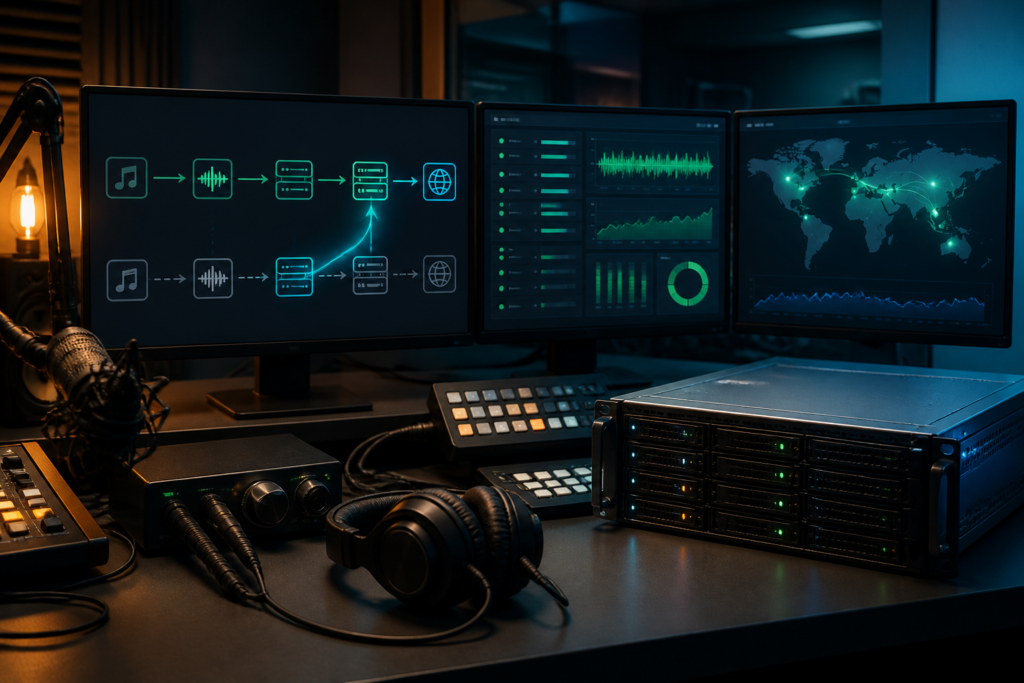
What a radio server migration can disrupt
These changes are related but not identical:
- Moving the stream server: the Icecast or Shoutcast service moves, while the public address may stay unchanged.
- Changing the host: the underlying provider, network or machine changes; firewall, ports and certificates may also need checking.
- Changing the public stream address: players, playlists, apps, directories and monitoring services must use a new URL.
Assess source connections, server configuration, metadata, proxy responses and listener access independently. A useful stream monitoring FAQ explains the difference between reachability and audible output. Before scheduling the move, establish the monitoring arrangement that will provide external evidence during cutover and rollback.
Map the complete streaming path before making changes
Document every hand-off in the service before moving an Icecast or Shoutcast server. A process running on the new host shows only that it has started. It does not confirm that the encoder can publish, the public endpoint can deliver audio or a listener’s player can connect.
Build the migration inventory
- Automation or playout system: record its output, schedule and the encoder it feeds.
- Encoder: note the host, port, protocol, source credentials and any mount or stream identifier.
- Stream server: document whether the service is Icecast or Shoutcast, including the relevant source and listener endpoints.
- Delivery layer: list the reverse proxy, TLS termination, firewall path and public hostname, where applicable.
- Listener-facing assets: record the final stream URL, web player source, M3U or PLS playlists, directory listings and any embedded players.
- Checks and alerts: include external connectivity and audio checks, log locations and the people who receive notifications.
For each item, record its current value, planned value and the person responsible for testing it. Include the station owner, engineer, hosting or network contact, web administrator and at least one listener-side tester. Testers should verify the public URL, not an internal address, using the player types and networks on which your audience relies.
Keep the old path available while testing the new one in parallel. The encoder connecting successfully to the replacement server is only one checkpoint. The migration is ready when audio, metadata, playlists, the web player and independent monitoring all confirm the intended public service.
Record the current service baseline
Before moving an Icecast or Shoutcast server, create a dated record of the service listeners receive. This gives you a reference for comparing the old and new paths without relying on memory.
- Save every public stream URL, port and mount name, including HTTP and HTTPS variants where both are published.
- Record the server software and version where known, along with the audio format, bitrate, sample rate and channel mode.
- Document the metadata behaviour: its source, the expected display and whether it appears in players, directories or station pages.
- List encoder and automation connections, player embeds, playlist files, mobile apps, website references and listener-facing pages.
- Note recent failure symptoms, maintenance events and any known differences between local and public access.
Test the public endpoint from more than one connection, and preserve the results as screenshots, command output or dated notes. A simple evidence table gives you a consistent comparison during cutover:
| Check | Expected result | Evidence |
|---|---|---|
| Connection | Endpoint responds successfully | Status and timestamp |
| Audio | Continuous, audible programme output | Player or listening note |
| Metadata | Current title or programme appears | Displayed value |
| Player loading | Acceptable load and playback | Device and browser recorded |
Keep the baseline with the migration plan so any differences after cutover can be measured.
Prepare the destination Icecast or Shoutcast server
Build the new environment alongside the live service. A complete radio server migration checklist checks the full connection path before moving any encoder or automation system.
Confirm the destination can reproduce the service
- Check that the host supports the required Icecast or Shoutcast software and a compatible version.
- Confirm the source connection method used by the automation system or encoder, including its authentication requirements.
- Match the current audio format, bitrate, sample rate, channel mode, mount name and metadata behaviour unless a change has been planned deliberately.
- Allow sufficient listener capacity and bandwidth for normal and peak usage. The host’s advertised resources do not, on their own, prove that capacity is available.
- Open only the listening and source ports required by the host firewall and any upstream firewall. Confirm that the public listening port is reachable from outside the server.
Separate copied values from new values
Use the current configuration as a reference rather than copying it blindly. The station name, mount naming, stream format and compatible limits may remain unchanged. Check or replace the destination address, server-specific paths, service-user details, source credentials, private keys and certificate paths as required. Where a reverse proxy is involved, check its upstream address, listening port, TLS configuration and path handling alongside the stream server itself.
Keep a dated, read-only copy of the current configuration, access details, certificates and recovery information in a secure location. Do not put passwords in notes or commands that are shared casually. Before connecting the production encoder, start the destination service and test it with a temporary source or controlled connection. A running process shows only that the server has started; it does not establish that the public endpoint or listener path works.
Test the new endpoint before the cutover
Before moving the live encoder, test the replacement address as a separate service. This establishes whether the new Icecast or Shoutcast server, its public route and the listener-facing player work together, rather than relying on a running server process as evidence that the migration is ready.
Use a controlled parallel destination
If the platform permits it, create a temporary hostname, port or stream path for the destination. Connect a test encoder or source from the same automation system, or use a separate test machine, without disconnecting the live station. Check that:
- the source authenticates successfully;
- the expected mount point or stream path is created;
- audio can be heard continuously;
- now-playing metadata reaches the test stream;
- the configured codec, bitrate and channel layout are accepted; and
- the intended player can load and play the address.
Test authentication separately from playback. A source connection may be accepted even when the public listener URL is wrong, protected by an unintended rule or served through the wrong proxy path. Check the direct server address as well as the public address when a reverse proxy or other front end is involved.
Check the endpoint from outside the host
Run a header request from a machine outside the hosting network:
curl -I -L https://example.invalid/temporary-streamReplace the example address with the controlled test URL. A response shows that an HTTP client reached an endpoint; it does not, on its own, prove that the response contains playable audio. A connection failure, timeout or unexpected status code points to the public route, firewall, proxy, DNS or access configuration. Resolve the issue before cutover.
Play the URL in each supported web player and in at least one external audio application or device. Record the result, including audible audio, metadata, authentication behaviour and the exact URL tested. This gives the cutover decision a clear pass or fail basis.
Plan the cutover and listener communication
Use a timed runbook for the final change. Treat the stream migration as a coordinated service switch, not simply a server copy. Record who owns each action, what evidence will confirm success and when the team will revert.
Before the maintenance window
- Announce a short maintenance window if a brief interruption is possible. Give listeners the expected time and any alternative listening option you genuinely provide.
- Pause non-essential changes to the automation system, encoder, player and stream configuration until the migration is complete.
- Agree the fallback decision with the person authorised to make it. Rollback should not be left to an informal discussion during an incident.
- Prepare the encoder change in advance. Record the destination host, port, mount or stream path, credentials and any format settings, without assuming they match the old service.
- Assign separate responsibilities for the automation output, encoder, server, proxy or public endpoint, player checks and listener communications.
Define success and rollback
Set out exact conditions before starting. Success might require the new server to accept the encoder, the public endpoint to return the intended stream, a player to produce audio and an external check to confirm connectivity. Roll back if any critical path remains unverified, the audio is silent or listeners cannot connect during the agreed window.
Keeping the public address stable while changing its backend is different from giving players a new address. The latter requires an explicit player and listener update plan. Manage domain and DNS work as a separate boundary rather than improvising it during the cutover.
Move the source connection with the shortest practical interruption
Change the source connection in a controlled order during the cutover. Stop the old path cleanly, start one verified destination path and check that the public endpoint is serving the intended stream.
- Freeze the source. Stop or pause the automation system and encoder, or use the documented source redirect control if your platform provides one. Do not leave the old encoder sending while configuring the new destination unless parallel sources are explicitly supported and isolated.
- Apply the destination settings. Update the encoder or automation output with the new server address, port, mount or stream identifier and source credentials. Exact fields vary between Icecast and Shoutcast versions, control panels and hosting providers, so use the destination’s current documentation rather than relying on assumptions from the old host.
- Connect once. Start the destination source, then check its server status, logs or connection view for evidence that audio is being received. Where those details are exposed, confirm that the expected codec, bitrate and metadata are present.
- Test the intended endpoint. Open the public stream URL through any reverse proxy and test it in a player. A working source connection does not prove that the public endpoint, proxy or listener route works.
- Retire the old path. After verifying the new endpoint, stop the old source and disable its automation output. Check both servers to ensure that an old encoder cannot reconnect or continue serving a competing stream.
This sequence applies whether you move an Icecast server or migrate a Shoutcast server. Record timestamps, connection evidence and test results. If the new source fails to appear or the public URL is incorrect, stop the destination source and restore the old connection while the evidence still points to the fault.
Verify the public stream from a listener’s perspective
Once the source has moved, test the final public URL as a listener would. A running encoder or healthy stream-server dashboard does not, by itself, show that the public endpoint, proxy or player is delivering usable audio.
- Connect to the public URL. Check that the address resolves and opens without an unexpected error, redirect loop or access prompt. Use the published URL rather than an internal server address.
- Listen immediately. Make sure audio starts after the connection and that it is the correct station feed. Note any error reported by the player, even if a direct stream client connects successfully.
- Maintain playback. Leave the stream playing for several minutes and watch for buffering, disconnects, silence or repeated reconnects. A brief successful connection is not enough evidence of a complete migration.
- Check station information. If the stream supplies metadata, check that the station name and current track or programme information appear as expected. Open any published
.m3uor.plsplaylist as well, and verify that it points to the intended endpoint. - Load the web player. Test the page in a normal browser and use its play control. When the direct stream works but the embedded player does not, record this as a player or delivery-path issue rather than marking the migration fully successful.
- Repeat externally. Test from a separate device and network, such as mobile data instead of the station’s Wi-Fi. Record the time, URL, device, network and result so that any rollback decision is based on evidence.
Monitor the transition and decide whether to roll back
Keep the old path available for the agreed observation period, but do not treat its availability as proof that the migration is healthy. Record the cutover time and monitor both paths against the checks in your radio server migration checklist.
- Check that the encoder or automation system remains connected to the intended source on the new stream server.
- Review Icecast or Shoutcast connection and access logs for rejected sources, repeated reconnects, unusual response codes and listener requests.
- Check the reverse proxy, public endpoint and web player separately. A successful source connection does not prove that listeners can reach the final URL.
- Use an external connectivity check where possible, and perform an audio check as well. A connection failure means the stream cannot be reached; silence means it can be reached but is not delivering usable audio.
Record the exact time of every failed check, alert, player error or listener report. Compare those timestamps with encoder, server and proxy logs. This evidence helps distinguish a migration fault from an unrelated network or programme problem.
Set rollback triggers before the change. Roll back if the public endpoint is unreachable, the source cannot remain connected, the published player path is broken, or confirmed listener disruption continues beyond the agreed tolerance. Restore the known-good path rather than making several unrecorded changes at once. Then repeat the public URL, player and audio checks from an external connection. Do not assume recovery simply because the old server is running: record a fresh successful verification and keep the incident timeline with the migration notes.
Close the migration without losing operational knowledge
After the new path has passed monitoring and listener checks, convert the migration details into usable operational knowledge. Update the service inventory to include the automation system, encoder, Icecast or Shoutcast server, proxy, public endpoint, players and responsible contacts. Record the final listener URL, server address, ports and the location of credentials, but do not place passwords in the document. Store configuration backups securely, noting the cutover time, test results, alerts, logs and any incidents.
- Remove temporary source settings, test mount points, hosts-file entries, proxy rules and monitoring checks.
- Check that current backups can be retrieved, and record who can restore them.
- Tell presenters, support staff, web administrators and other stakeholders that the change is complete.
- Schedule a review after normal programming has resumed, including checks of listener feedback and monitoring history.
Final next actions
- Same public URL: check that every player still uses the unchanged address, then close the temporary test path.
- New listener-facing URL: update websites, apps, playlists, directories and partner documentation, confirming each change independently.
Keep the old service available only for the documented rollback period. When that period ends, verify that rollback is no longer required, take a final archive, revoke obsolete access and retire the old service deliberately.